


Wikinggruppen for eCommerce: 6 Decisions to Make Before You Migrate, Redesign or Optimize
Online stores often plan a platform change and a redesign as two separate projects. Problems tend to show up where the two overlap: a design that needs more development than the platform's standard structures allow, or a new platform that inherits the old store's usability problems.
General Prepper, a Swedish retailer of emergency preparedness and outdoor gear, handled both in one project. It moved from Abicart to Wikinggruppen while our team redesigned 23 page templates. Before the redesign, its analytics showed that about two in three users who started checkout didn't finish.
If you're considering Wikinggruppen, or already sell on it, this guide covers what the platform offers, which business needs it fits and the six decisions to settle before you migrate, redesign or optimize.
What Is Wikinggruppen?
Wikinggruppen (WGR E-handel AB) is a Swedish hosted eCommerce platform for B2C and B2B merchants. You buy one package, WGR Custom, and add optional modules; WGR's own developers handle implementation and support.
The company has operated since 2005 and has been part of Visma since 2021. WGR positions the platform for merchants whose business logic, integrations or flows have outgrown templates and standard solutions.
WGR's official pages describe what the platform provider covers. Your own project still has to cover the rest:
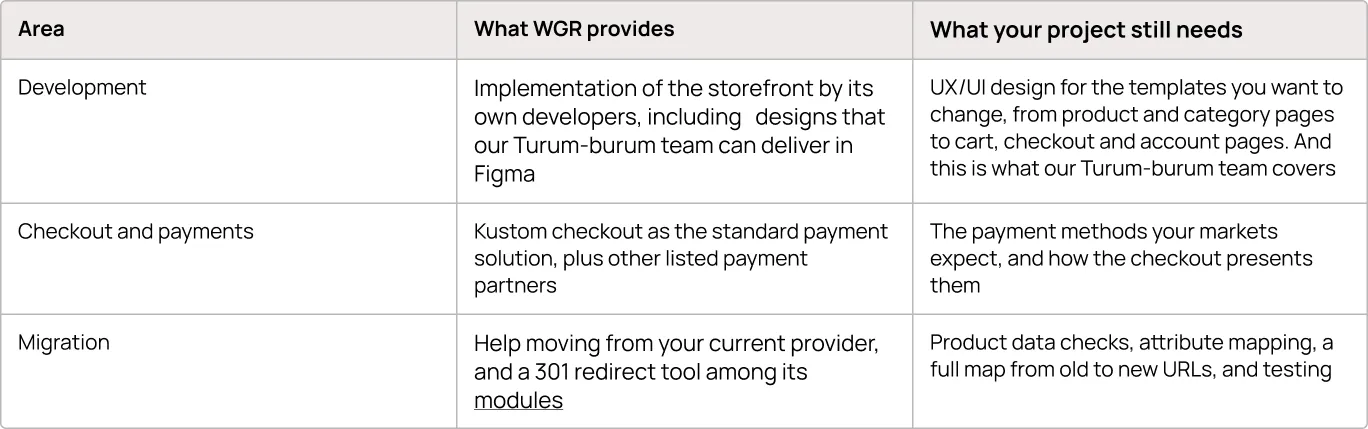
Which Business Needs Does Wikinggruppen Fit?
Wikinggruppen suits businesses that want one supplier for platform, development and support, and whose requirements match its modules and integrations. Store size matters less than how well your needs map onto what WGR offers as standard.
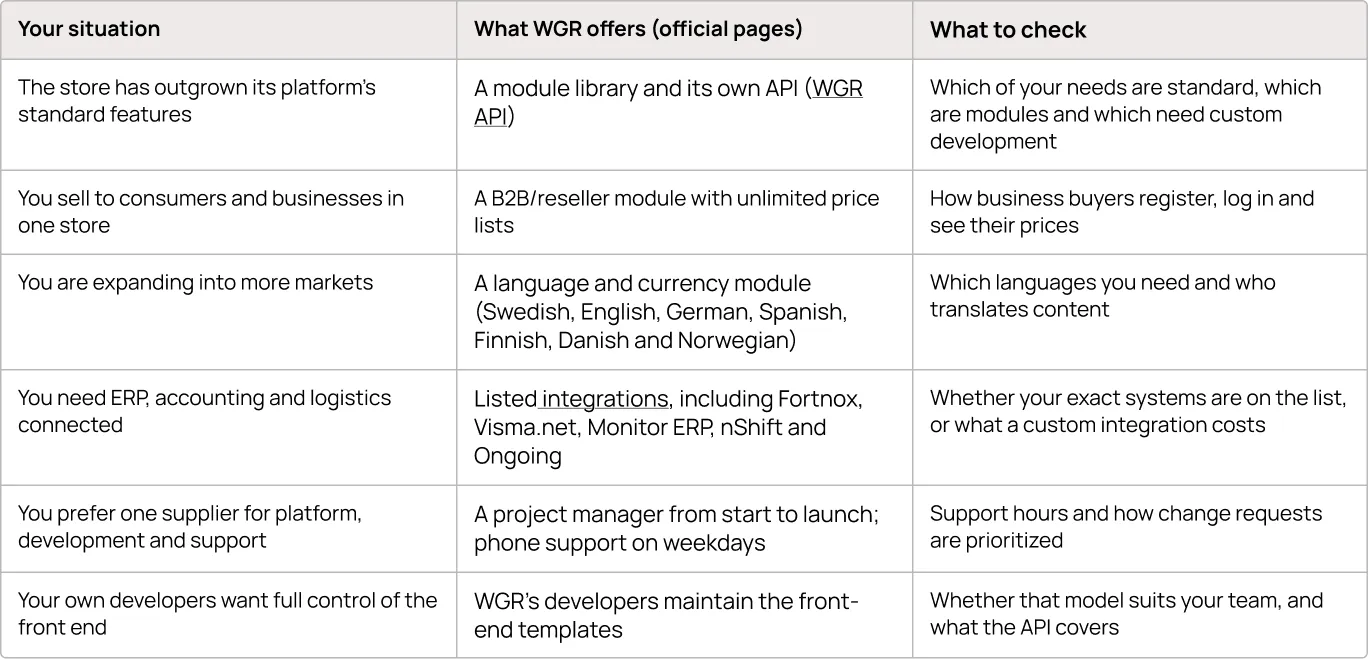
If you already run a store on WGR, start from the middle column: check which listed modules and integrations you don't use yet before assuming a new need calls for custom development or another platform.
6 Decisions to Make Before You Migrate, Redesign or Optimize
These decisions apply whether you're moving to Wikinggruppen or already selling on it. The first one sets the size of the project, so start there.
1. Name the Problem: Platform Limits or Journey Friction
A missing feature is a business constraint. Whether it justifies a new platform depends on four questions:
- Can you close the gap where you are? Configuration, an existing module, an integration or custom development may cover it.
- Will the current platform support where the business is heading? Look past today's gap to the markets, sales channels and integrations planned for the next few years.
- What does each route cost? Compare extending the current platform with migrating, and count design, data migration, redirects and your team's time.
- What will customers notice? A change to how people find products, buy and come back also affects revenue.
Journey problems need a different response. Changing platforms doesn't solve existing UX problems by itself: unclear navigation, a long checkout or a weak mobile layout can reappear on the new platform unless the team identifies them and addresses them during migration planning.
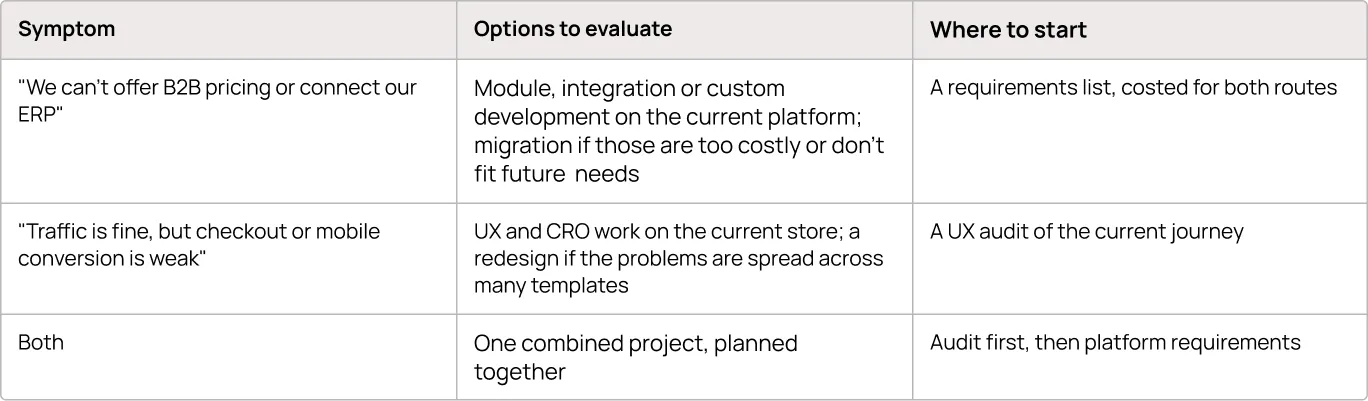
Real-life example. Before the General Prepper redesign, our team Turumburum.com used GA4 and Microsoft Clarity to see where buyers dropped out. About two in three users who began checkout didn't complete it, and a large share of visitors never scrolled far enough to reach the order button. A new platform alone would not have fixed those problems; they had to be part of the redesign.
When optimizing beats redesigning. If your store already runs on Wikinggruppen, the same audit shows whether you need a full redesign at all. When friction sits in a few places (checkout steps, filters, mobile navigation, a hard-to-find B2B entry), targeted changes to those templates are a smaller commitment and easier to measure, because fewer things change at once. A broader redesign makes more sense when problems run through most templates, the navigation no longer fits the catalog, or the visual identity needs replacing.
If you're still choosing between a rebuild and a refresh, our website revamp checklist and our guide to choosing eCommerce technologies can help.
{{block}}
2. Agree Who Designs, Who Builds and Who Changes What
On Wikinggruppen, WGR's developers build the storefront and control the front-end templates. They can work from designs an external team, like Turum-burum’s, delivers in Figma, so the team that designs your store and the team that builds it can be different. If roles aren't agreed before design starts, change requests surface late in the build.
Two points from WGR's answers during the General Prepper project matter for planning:
- A design that departs from an existing page structure may need more development time, because some functions depend on those structures.
- Certain account pages, such as order lists, profile and address book, are currently changed only by WGR's developers. If repeat buyers matter to your business, put those pages on the list from the start.
Real-life example. Our team delivered Figma designs for 23 General Prepper page templates, desktop and mobile, plus a design system. The UX/UI solutions were coordinated with Wikinggruppen's developers, who implemented them. The site is live, and the client is satisfied with the result.
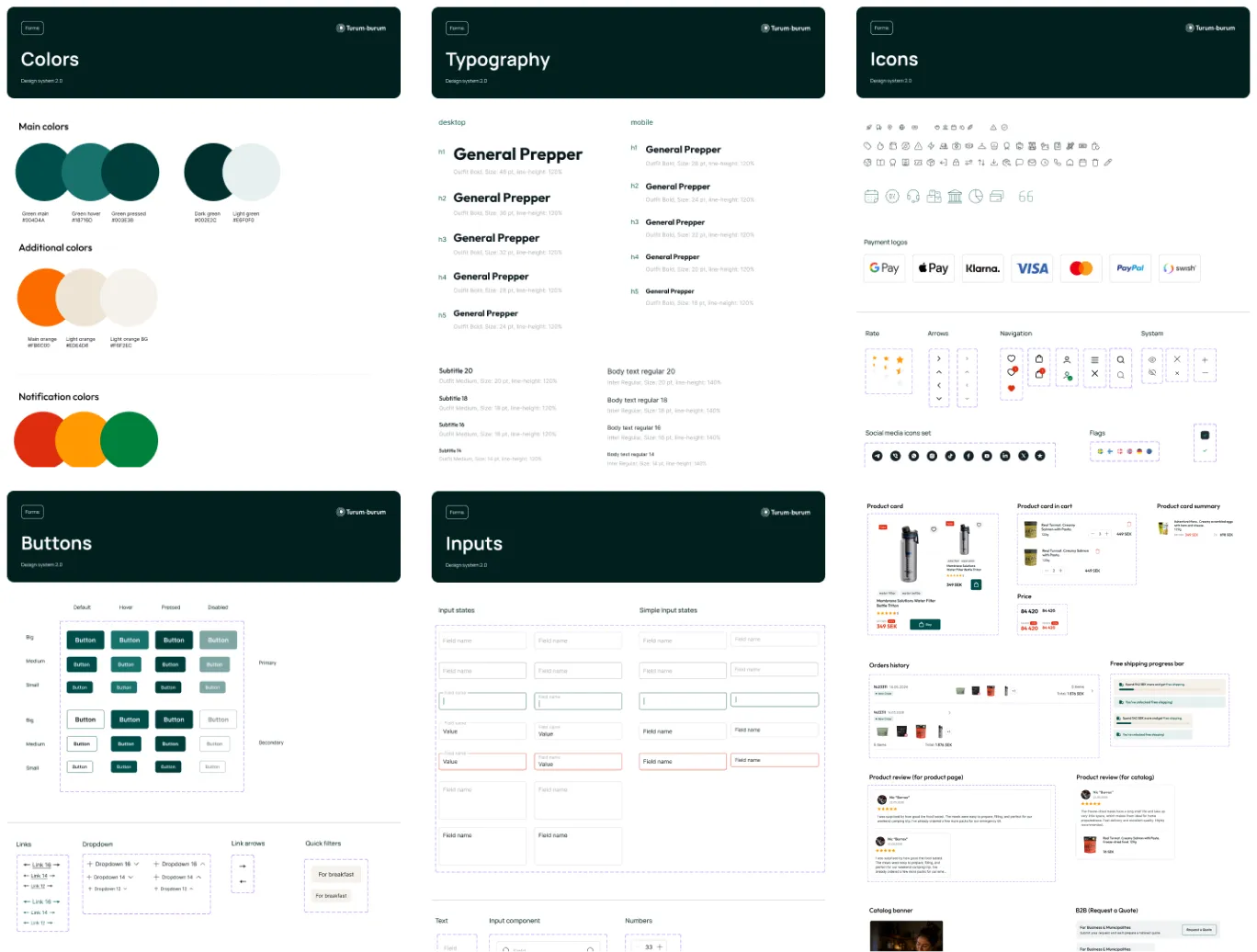
Before design starts, list each template with who designs it, who builds it and who can change it after launch. A discovery phase is a good place to do it.
3. Design Around the Structures the Platform Already Has
Start from the page types and components the platform already provides, and adapt them. Before you plan a new page type, check whether a category, a content page or a module can carry the content.
A category listing, for example, comes with product listing, filtering, sorting and add-to-cart logic that the platform maintains. Adapting it still takes design and development work, but nobody has to specify and build that logic from scratch.
Real-life example: brand pages. General Prepper sells products from brands such as Trangia and Primus, and shoppers needed a way to browse and buy by brand. Its Wikinggruppen setup had no dedicated brand page type. Working with WGR's developers, the team adapted a structure the store already had: each brand became a category under a brand index. That let brand pages reuse the platform's existing category listing instead of requiring a new page type.
The live pages follow that approach: each brand under /varumarken/ is a category listing with a product count, a price filter, quick filters, sorting and buy buttons. Brand content varies by brand. On the Trangia page, a brand story, guides and an FAQ appear after the products, while the Primus page shows products only.
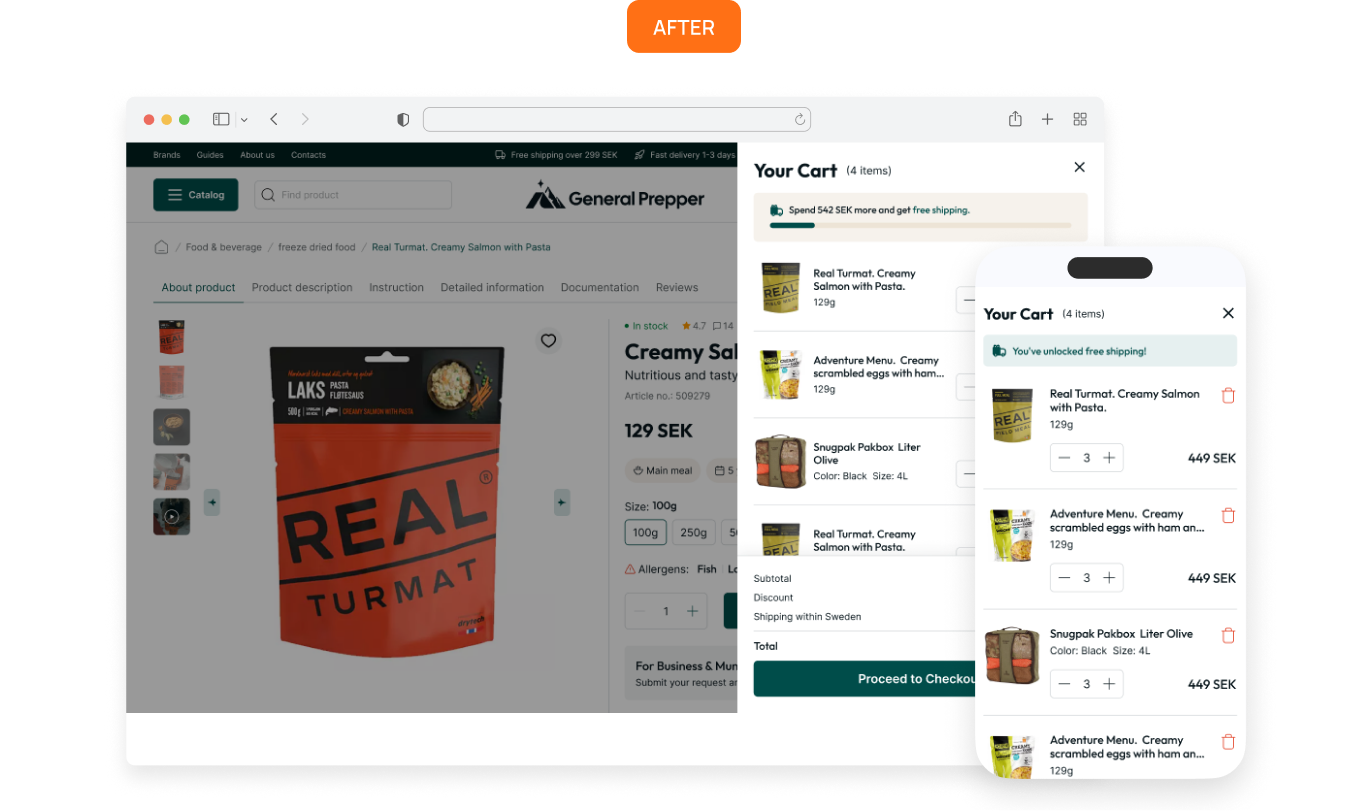
Real-life example: cart and checkout. Before the redesign, General Prepper's cart and checkout were one long page. Changing a quantity needed a separate refresh, payment stayed blocked until the shopper chose a delivery option, and mobile users faced a long scroll to reach the order button.
.webp)

Our team redesigned the cart as a side panel with instant quantity controls and a free-shipping progress bar, and designed checkout as a dedicated page without the main navigation or footer, organized into three blocks: Contact → Delivery → Payment.
.webp)
On the platform side, WGR told the project team that cart and checkout design can be adapted extensively, within the way its checkout scripts are structured. Ask where those limits sit before you finalize checkout designs. If you already run a WGR store, you can also review the checkout on its own, without a wider redesign; our checkout best practices cover the principles.
4. Plan Product Discovery Together With Your Catalog Data
Filters can only use product attributes that exist in your catalog. Plan attributes and filter design together, whether as part of a migration or before you redesign navigation on your current store.
WGR offers live search and advanced filtering based on the attributes assigned to products. Your catalog data therefore sets the practical limit: a "shelf life" filter needs products to carry a shelf-life value. If only part of the range has that value, shoppers can get incomplete or misleading results, depending on how the filter is implemented.
Real-life example. For General Prepper, the redesign replaced a menu of more than 20 text links with 17 categories marked by line icons, and moved products higher on category pages. Our team also designed filters for allergens, meal type, shelf life, format and number of servings, plus search that shows matching categories and products while the visitor types. Our filters checklist explains how to choose filters like these.
.webp)
On an existing WGR store, start with the data you have: searches that return no results, the filters people use, and attributes left empty across large parts of the catalog.
URLs need the same planning in a migration. WGR provides a 301 redirect tool for stores changing provider, but you still need to map every old URL to its new address, especially for categories and products that bring organic traffic. Google's guidance on site moves with URL changes sets out the steps.
5. Give Each Buyer Type Its Own Path
If you sell to both consumers and businesses, decide early how business buyers find their offer, register and see their prices.
WGR's B2B/reseller module provides reseller logic and unlimited price lists. Navigation, entry points and the registration flow determine how easily business buyers find and use that offer, and those are design decisions.
Real-life example. Before the redesign, General Prepper's business customers could reach their offer only through a small link in the top bar. The redesign gave consumers and business buyers separate entry points from the first screen, and product pages gained documentation for municipal procurement. On the live site, "Företag & kommun" (business and municipalities) and "Avtalskund" (contract customer) lead to the B2B paths.
.webp)
To check your own store, open the homepage on a phone and count the steps a business buyer needs to reach their offer. Our article on UX for B2B and B2C covers how the two journeys differ.
6. Decide What Success Looks Like Before Launch
Record baseline metrics before you migrate, redesign or launch changes, so you have something to compare against afterwards.
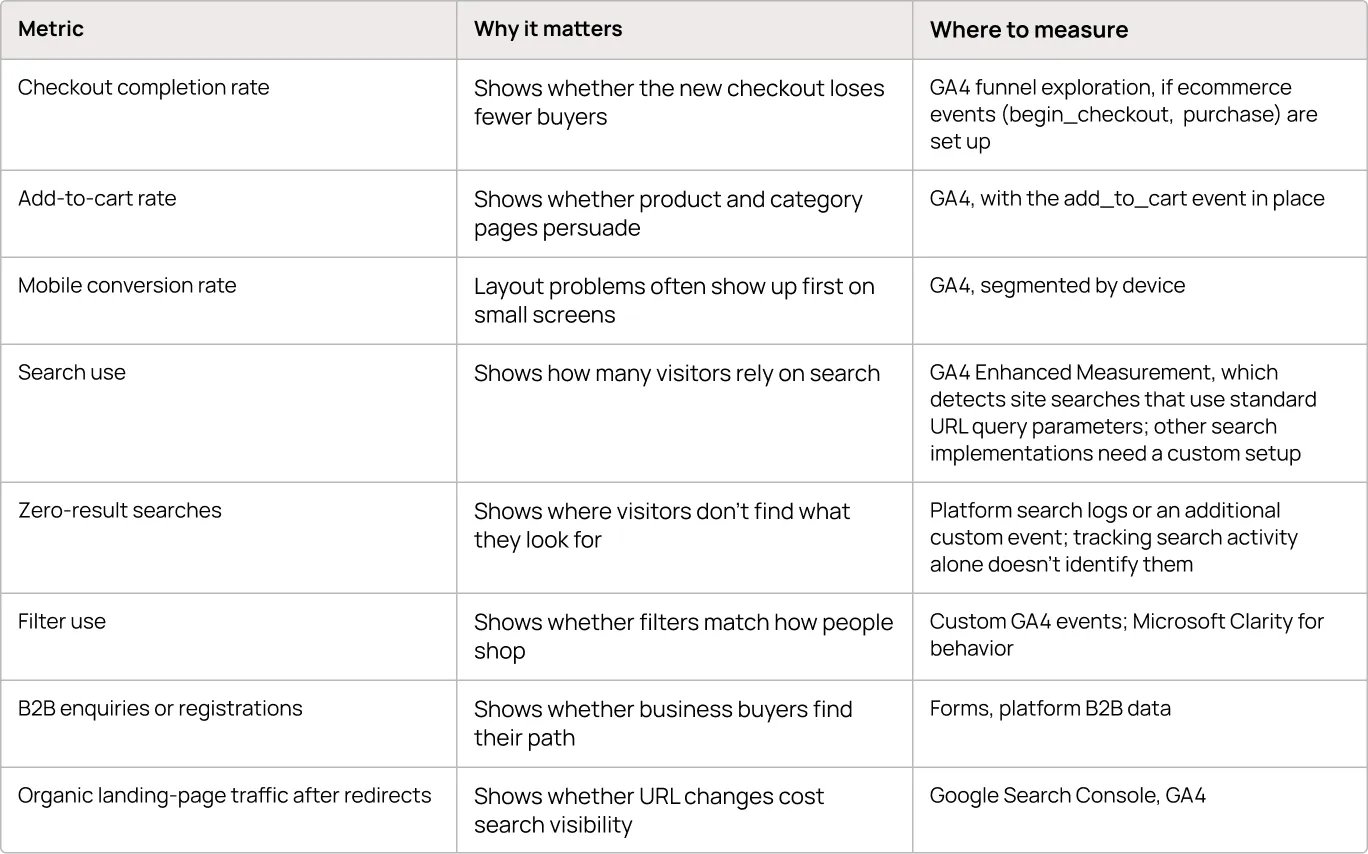
Microsoft Clarity's recordings and heatmaps help explain why a number moved; they don't replace conversion tracking.
Treat before-and-after comparisons with care. A platform change often changes the tracking setup too, and seasonality, campaigns and traffic mix move the same metrics. Compare like-for-like periods, note the launch date and major campaigns, and check that each metric is measured the same way on both sites. A GA4 audit before migration helps keep the numbers comparable.
Before the project starts, export the last few months of these metrics from your current store, note how each one is tracked, and save the export where the project team can find it after launch.
Platform Change or UX Work: Where to Start
If your current store covers what the business needs but loses buyers along the way, targeted UX and CRO work can be a smaller, more measurable investment than a migration or a full redesign.
When a migration or large redesign is the right call, the decisions that shape cost and outcome come before design starts: what the platform provides, who builds what, and which existing structures the design can use.
General Prepper's brand pages are a small example. One agreed decision, a category per brand, let those pages use the platform's existing category listing instead of a new page type.
Choose the platform for what your business needs; design the store for what your buyers do.
Then measure what changed.
FAQ
What should you prepare before migrating to Wikinggruppen?
Prepare a requirements list marked standard, module or custom; clean product data with the attributes your filters need; a map from every old URL to its new address; and baseline metrics. WGR offers migration help and a 301 redirect tool, but your team still plans and checks the wider project.
Can you improve an existing Wikinggruppen store without a redesign?
Yes, when friction sits in a few places. A UX audit shows where buyers drop out, for example in checkout steps, filters, mobile navigation or the B2B entry. Targeted changes to those templates are easier to measure than a full redesign. Check unused modules and integrations before planning custom work.
Which payment options can a Wikinggruppen store use?
Kustom checkout, the former Klarna Checkout, is WGR's standard payment solution. WGR's partner list also includes Svea Checkout, Qliro, Walley, Avarda, PayPal and Swish. Decide which methods your markets need before checkout design starts.
Planning a migration, a redesign or improvements to your current store?
Turum-burum, a UX/UI design and CRO agency, can review where your store loses buyers and what to fix first, on any platform.
Question reference
Answer reference


.png)


.png)


More real-world Turum-burum cases?
Review our vast portfolio of cases in a variety of business fields to make sure of our expertise.
Go to Portfolio
