


Shopify Limitations Explained: What to Work Around and When to Upgrade to Plus
Is your current Shopify plan holding your business back by limiting your growth, UX, or operational processes? When is the right time to upgrade to a higher Shopify plan? When is Shopify Plus worth it, and when is it not?
To answer these questions, we surveyed several leading Shopify agencies and analyzed how different plans perform in practice, from page and catalog design to checkout, integrations, and international scaling, to determine when limitations aren’t an issue and when you really need to switch to Shopify Plus.
The findings might surprise you.
Special thanks to our partners and Shopify experts:

- Mike Bashkatov, CEO & Co-Founder at Binary Future, eCommerce and Shopify expert with 10+ years of industry experience.
- Olha Atamaniuk, Head of Partnership at Web-Systems Solutions, specializing in business development and Shopify solution consulting.
Shopify Plans at a Glance
Whether it's Shopify Basic or Shopify Plus, the storefront experience feels almost the same. So, why pay more?
The meaningful differences appear behind the scenes: checkout customization, international expansion, B2B workflows, API capacity, and operational scalability. That's where upgrade decisions actually get made. But one thing at a time.
So before we get into the nitty-gritty of the limitations, here’s a quick reference matrix of what each plan actually includes:
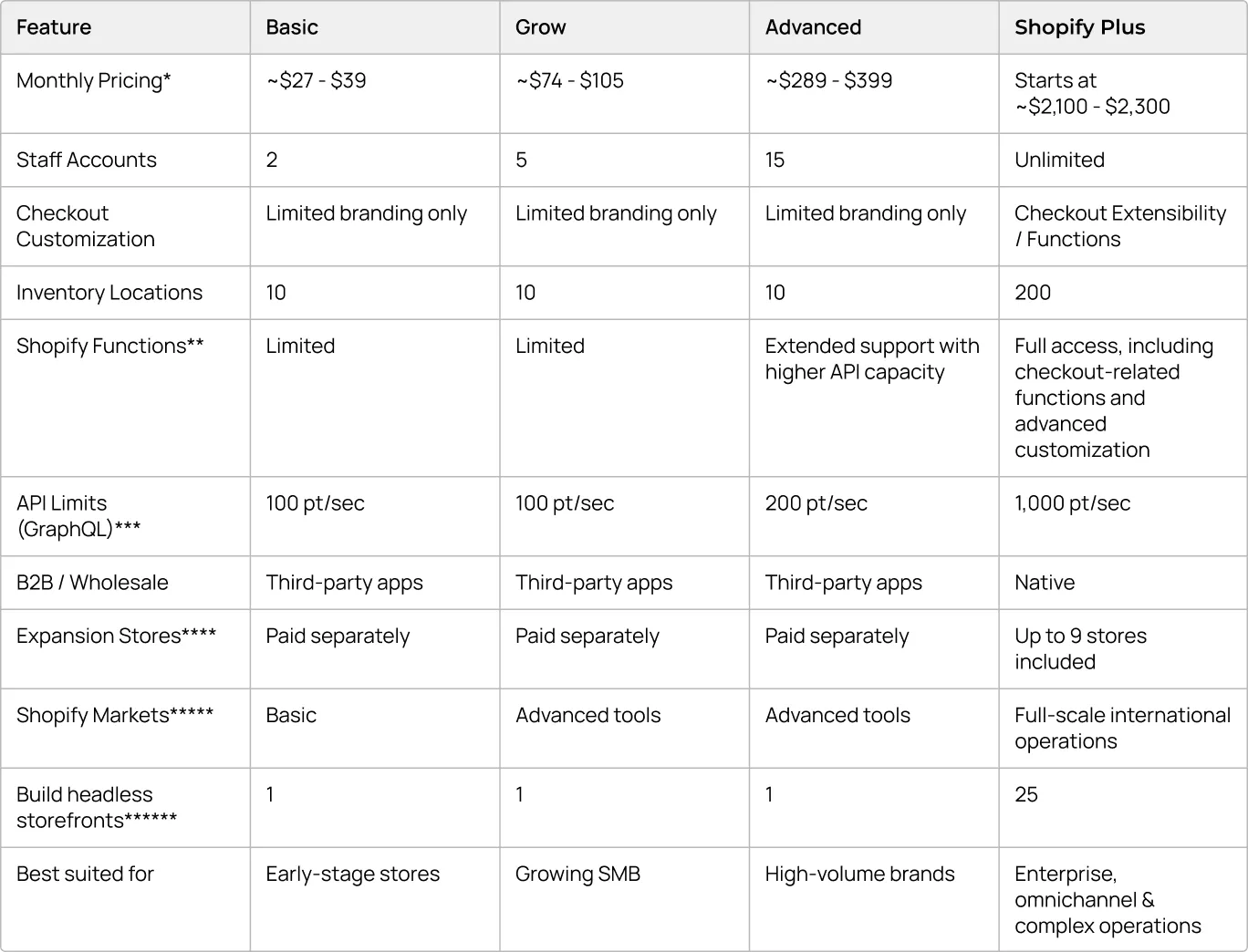
Key terminology and plan differences explained:
*Monthly Pricing: Prices are approximate as they vary depending on your geographic location and whether you choose monthly or yearly billing (which can save up to 25%).
**Shopify Functions: Advanced plans provide limited data access for building custom apps, whereas Shopify Plus gives full data access and allows developers to personalize the store with custom functions for complex discounts, shipping rules, and payment logic.
***API Limits: API limits are measured in GraphQL points per second (pt/sec), measuring how many requests your store's backend can process simultaneously. The more points available, the more data your integrations, ERP systems, inventory syncs, and custom apps can process without hitting rate limits. Shopify Plus offers up to 500% higher API call limits or up to 10x on select APIs compared to standard plans.
****Expansion Stores: Shopify Plus includes up to 9 free expansion stores. This means you can create separate, dedicated storefronts (e.g., for different international regions or B2B) under a single contract without paying for extra subscriptions.
*****Shopify Markets: This is a native toolset for localized selling. It allows merchants to enable integrated translations, show prices in local currencies, and estimate and collect duties and taxes for global buyers.
******Native themes & headless stores: All Shopify plans support headless storefronts. Shopify Plus increases the number of supported headless environments and provides additional enterprise-level infrastructure options.
For context:
- A native Shopify theme is an all-in-one setup where the storefront is built and hosted directly within Shopify's ecosystem, using Liquid, Shopify's templating language, along with standard theme architecture and apps. Native themes are easier to maintain, fully compatible with Shopify features, and typically require lower development and support costs.
- A headless store separates the frontend presentation from the backend commerce engine, often using tools like Hydrogen, Shopify's React-based toolkit, deployed on Oxygen, Shopify's free global hosting solution. Instead of rendering pages through Shopify themes, developers build a custom frontend using frameworks such as React, Next.js, or Shopify Hydrogen and connect it to Shopify through APIs.
This approach offers greater flexibility but also increases development complexity, maintenance costs, and dependency on technical teams.
And here is the question: what plan fits you at the moment? Let's check it out.
Shopify and Shopify Plus: The Limits That Matter for UX, Growth, and Scalability
Now’s the time to discuss common Shopify limitations across the funnel, from the homepage to post-purchase, and even behind the scenes, to understand where they become noticeable and how the agencies solve them in practice and when it’s better to upgrade to Shopify Plus.
Homepage & Landing Pages (Design Freedom vs. App Bloat)
The first limitation most teams encounter isn't Shopify itself or its plans, but it's architectural complexity.
When you need landing pages for campaigns, seasonal promotions, and rapid experimentation, the fastest solution is usually to use a page builder like Shogun or PageFly. It allows teams to launch pages on Shopify without developer involvement and test new ideas quickly. But over time, this flexibility can come at a cost.
Every new widget or page-builder block adds scripts and dependencies. As the storefront grows, pages become heavier, Core Web Vitals decline, and users may experience layout shifts, slower interactions, and reduced mobile performance.
To address these issues, merchants often turn to "speed optimization" apps. However, as one surveyed agency warned, these apps "just trick scoring tools rather than actually improving the site and user experience." (Olha Atamaniuk, Head of Partnership at Web-systems Solutions)
To avoid the problem, many surveyed agencies advise building custom Shopify themes tailored to the store's actual needs. This removes unnecessary code and provides a more reliable foundation for growth.
Besides that, homepage and landing pages should be designed around key customer journeys, not around available widgets. Focus on elements that help users move through the funnel: promotional banners, trust-building blocks, category navigation, product recommendations, and FAQs.
During website redesign, it's also worth reducing above-the-fold complexity, prioritizing mobile-first layouts, and choosing content clarity over visual effects. In most cases, a focused user journey will drive better results than a feature-heavy page.
Product Pages: What To Do With the 3-Option Cap?
Shopify supports up to 2,048 variants per product but still limits merchants to three option types (for example, Size, Color, and Material). For brands selling highly configurable products, this can seem restrictive.
In practice, however, agencies rarely see it as a reason to upgrade. The real challenge isn't the limitation itself, but how merchants choose to work around it. Many rely on product-option apps, which often add complexity, slow down variant updates, and create friction around pricing, inventory, and Add to Cart interactions.
Agencies typically use Metaobjects, Metafields, or linked-product architectures instead:
"By default, variants are limited through option types... But with MetaObjects and Metafields, you can bypass it pretty easily, and I think that's a known workaround." — Mike Bashkatov, CEO at Binary Future
Another common approach is separating additional attributes into individual SKUs and connecting them through theme logic, similar to how Apple presents product variations. Different colors, for example, can be separate product detail pages visually linked through color swatches on the frontend. A clean product architecture eliminates the need for heavy configurator apps, keeps interactions fast, and creates a smoother path to purchase.
{{block}}
Catalog & Navigation: When Native Search Stops Being Enough
For merchants managing large inventories, one of the noticeable Shopify limits is the 50,000-variant threshold. Once a non-Plus store exceeds it, new variants can only be created at a rate of 1,000 per day. For businesses with large seasonal launches or frequent catalog updates, this can quickly become a bottleneck.
Yet agency experience shows that even this limitation doesn't automatically require Shopify Plus. One of the most surprising examples from our interviews was a store operating with nearly 3.5 million SKUs on Shopify Basic:
"We're operating with almost 3.5 million SKUs... We're just displaying products from an external database on the fly to Shopify using simple liquid templates and async synchronization. They are on the Basic plan and doing pretty well." — Mike Bashkatov, CEO at Binary Future, about Toolsman Case
By storing product data externally and rendering it dynamically on the frontend, the agency bypassed the limitation entirely. Implementing this workaround took about a month, making it significantly cheaper than upgrading to and maintaining a Shopify Plus setup.
But managing a large catalog is only half the challenge; users still need to be able to find products quickly. For most Shopify stores, native search and filtering work perfectly well.
“Problems usually appear when catalogs exceed roughly 5,000 items or require advanced faceted filtering, custom sorting, or more sophisticated product discovery flows.” — Olha Atamaniuk, Head of Partnership at Web-systems Solutions
However, instead of upgrading plans, Shopify agencies usually combine better information architecture with dedicated search solutions such as Algolia or Klevu. Often, optimization of category structures and hierarchies, filter logic, and search relevance delivers a bigger impact than changing Shopify tiers. The key moment is to do that based on the real customer behavior, not assumptions.
Cart Optimization to Maximize AOV Before Checkout
Cart upsells are frequently cited as a reason to upgrade. However, while Shopify Functions on the Plus plan do provide more backend flexibility, agency experience shows that it is entirely possible to handle extensive upsell logic and large cart experiences without upgrading to it.
When it comes to non-Plus Shopify, many merchants rely on third-party upsell apps to add product recommendations, bundles, or free-shipping progress bars. Yet, instead of stacking multiple third-party apps, agencies often build custom slide-out cart drawers, upsell blocks, and promotional logic directly into the theme, pairing them with Shopify's native discount functionality.
"I wouldn't recommend using applications for those carts, or at least do that customly. We were doing pretty heavy upselling for [clients like] Mylee and French Fitness... the carts were huge, and the add-ons for the products, there were tons of them, but it never slowed down that side of the cart. I wouldn't recommend switching to Shopify Plus just for that, unless it’s one more reason to do so." — Mike Bashkatov, CEO at Binary Future
Whatever technical route you choose, remember that the shopping cart is the last stage before checkout, where merchants can increase Average Order Value (AOV). It is crucial to design this space smartly so that cross-selling and upselling tools naturally support the purchase decision rather than distracting from it.
Checkout: Where Shopify Plus Changes the Rules
Unlike product pages, search, or cart logic, checkout is one area where workarounds eventually run out.
On Shopify's standard plans, checkout is largely a controlled environment. Merchants can customize branding elements and certain native checkout settings, but they cannot modify the checkout flow itself.
This becomes a limitation when businesses need the following:
- B2B-specific checkout flows;
- Loyalty program integrations directly into the checkout UI;
- Custom fields and validation rules (like capturing tax IDs or restricting specific PO boxes);
- Specialized shipping or payment logic based on region;
- Post-purchase upsells and personalized checkout experiences.
For Plus users, Checkout Extensibility makes that possible. Interestingly, while Shopify strictly limits these custom UI scripts to a maximum of 64 KB to protect loading speeds, developers do not find the limit restrictive:
“I never heard from my technical staff that we were affected by this 64 KB limit... You can split them into a few extensions. It's still accessible enough to work with it nicely without feeling the pain.” — Mike Bashkatov, CEO at Binary Future
Because checkout is locked on standard plans, most CRO efforts shift to the stages before and after payment. Agencies typically focus on optimizing product pages, cart experiences, trust signals, checkout permalinks, and post-purchase flows to improve overall conversion rates.
"You can do certain things on the product page, the cart page... After the Thank You page, you can redirect them anywhere you want. So this is not a final step for any upsells or custom logic." — Mike Bashkatov, CEO at Binary Future

APIs, Integrations, and Operational Scaling
While merchants usually focus on storefront UX, the real breaking point for scaling businesses is backend operations. Standard Shopify plans have strict API limits (100-200 points per second).
On a normal day, that is fine. But during Black Friday traffic spikes or the Christmas holiday rush, when an ERP tries to sync thousands of inventory changes across multiple warehouses, API calls overflow and fail, risking oversold products. That is where Shopify's API limits become more visible.
However, agencies don't immediately recommend Shopify Plus (which offers 1,000 pts/sec). Instead, they optimize architecture first. Common approaches include:
- GraphQL: Fetching massive amounts of data in a single, efficient request rather than draining the limit with hundreds of smaller REST calls.
- Webhooks: Relying on event-driven notifications (Shopify pings the ERP instantly when an order happens) rather than having the ERP constantly "ask" Shopify for updates.
- Middleware queuing: Syncing critical stock levels instantly, but delaying heavy data updates (like product descriptions or tags) until off-peak night hours.
"Since limits are on the number of requests, there can be optimization of the number of requests. Also, if we are talking about updating data, you should choose the GraphQL API — it slightly expands the limits compared to REST." — Olha Atamaniuk, Head of Partnership at Web-systems Solutions
Multi-location operations create another layer of complexity. Managing different warehouses, inventory pools, shipping rules, currencies, and regional storefronts often requires more than simply increasing API capacity.
And if your dev team is spending dozens of hours a month just managing custom middleware to avoid API crashes across complex multi-location operations… at this point, businesses begin to think about whether maintaining custom integrations is getting more expensive than moving to Shopify Plus.
When Basic, Grow, or Advanced Is Still the Smarter Choice
So, if you operate a single brand in one or two monolithic markets, are satisfied with standard checkout conversion rates, and have a team that knows how to build fast interfaces and solve complex product logic natively, rather than installing 15 conflicting third-party apps, do not rush to pay enterprise invoices.
That also applies to architectural trends like headless commerce. While Shopify Plus beautifully supports advanced architectures, agencies repeatedly point out that it suits not all merchants.
One expert recalled a case where headless architecture clearly made sense: a company that operated 26 Shopify Plus stores and generated around $100 million annually. For most others, it just leads to higher maintenance costs and slower implementation cycles.
"To maintain a headless Shopify Plus store would cost you anywhere from $10k to $15k a month. With a native theme, $4k to $6k is good enough. We're looking at three times less budget allocation." — Mike Bashkatov, CEO at Binary Future
"It’s important to note that choosing a headless setup limits your ability to customize the site from the admin panel, and you won’t be able to use apps from the Shopify App Store." — Olha Atamaniuk, Head of Partnership at Web-systems Solutions
This doesn’t mean headless is bad. It means it should solve a specific business problem, not exist because it sounds more "enterprise." And, as we've explored, many apparent limitations can be solved through smart architecture on standard plans.
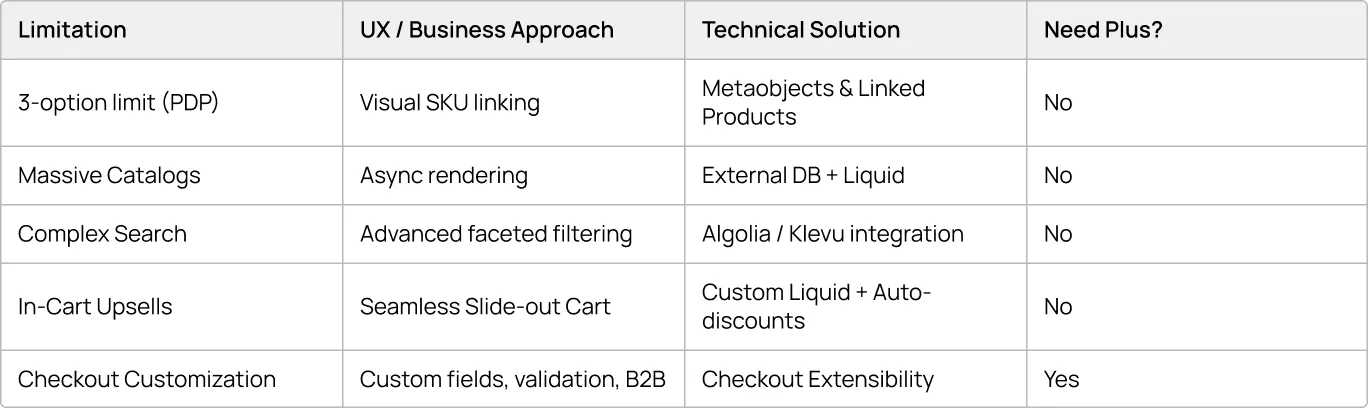
The real question before any upgrade: is this limitation actually affecting customer experience, conversion rates, or operational efficiency, or is it just an architectural problem that can be solved more cheaply?
When Shopify Plus Makes Sense
So, who is Shopify Plus actually created for, and what exactly are businesses paying approximately $2,300/month for? The enterprise tier becomes necessary when manual workarounds become expensive, API limits choke operations, or multiple international stores become impossible to manage.
The recurring upgrade triggers are:
1. Checkout customization & B2B. If your business model requires complex B2B purchasing workflows, custom validation rules, or loyalty integrations right at the point of payment, Plus is your only path forward via Checkout Extensibility.
2. International expansion. Managing one brand across multiple borders is a primary tipping point. When expansion requires different domains, regional shipping carriers, and localized pricing, standard Shopify Markets often isn't enough.
“That's markets... any client hitting international sales and shipping and currency conversion... different domains like bluemix.com and bluemix.ca. They need logic for shipping carriers and discounts in another location. If they expand to that point, it's wise enough to switch to Plus.” — Mike Bashkatov, CEO at Binary Future
3. When workarounds cost more than the upgrade. If maintaining your "hacks," external databases, and API middleware starts costing more than $2,300 a month in developer time, upgrading becomes a financial decision, not just a technical one.
4. Bonus (that comes from pure math). If your monthly transaction volumes reach roughly $200,000 to $300,000, the savings on credit card processing fees often fully cover the Plus subscription. The upgrade essentially pays for itself.
{{block}}
The Biggest Shopify Myths Busted: Not Every Limitation Is Actually a Problem
One of the biggest misconceptions is that merchants inevitably “outgrow” their Shopify plan.
As you saw, agency experts show the reality, and it’s quite the opposite.
Many stores never reach the limits that dominate online discussions. Others technically hit those limits but solve them without upgrading. And some discover that the bottleneck isn't the platform at all but architecture decisions made years earlier.
In most cases, architecture decisions matter more than subscription tiers. Yet, "most" doesn't mean "all." Shopify Plus is created to make complex enterprise international projects operate more smoothly and easily.
So, before switching to Shopify Plus, determine whether the limitation is actually affecting customer experience, conversion rates, or operational efficiency, slowing down your Shopify project scaling and growth.
The real problem isn't the limitation itself. It's how you choose to solve it.
The real question isn't which Shopify plan is better. It's which capabilities your business actually needs.
FAQ
Question reference
Answer reference


.png)






.png)

More real-world Turum-burum cases?
Review our vast portfolio of cases in a variety of business fields to make sure of our expertise.
Go to Portfolio
